
Tour
A tour inside the system — before you call us
Every screenshot here comes from a real instance, in its own Arabic and its own numbers. No illustrations and no machine-translated interfaces. Where a capture does not exist yet, we say so on the frame itself instead of showing you a stand-in.
The dashboard
The owner’s first screen every morning: visits over the last two weeks, what each crew finished this month, contracts expiring within thirty days, completed visits not yet invoiced, and receivables aging. This is the cleaning edition’s dashboard — no five reports needed to know where you stand.
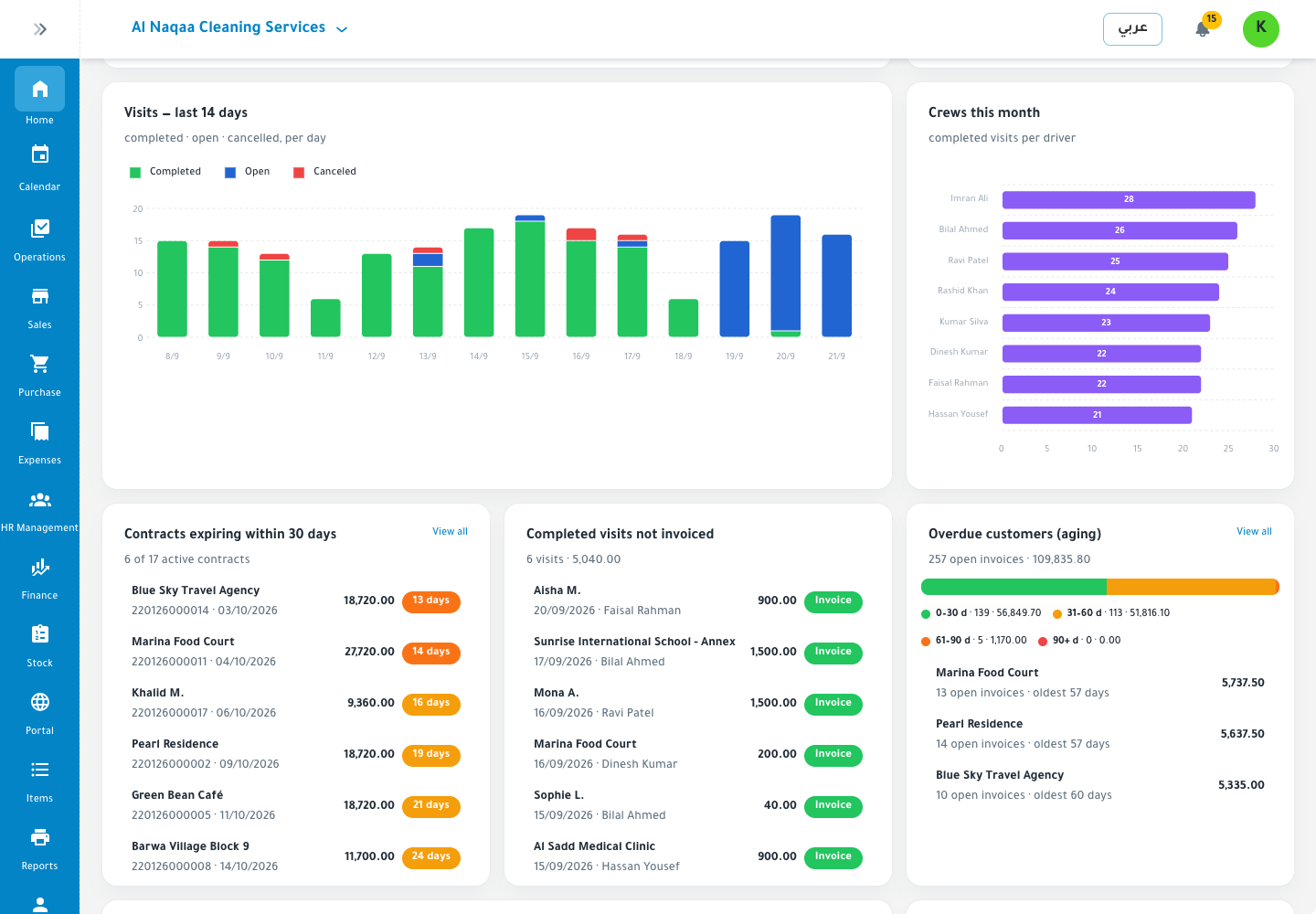
You know how your company is doing in half a minute, not half a day.
Selling and invoicing
A quotation becomes an order, the order becomes an invoice, the invoice becomes a collection — and each step writes its own ledger entry. The POS keeps selling offline and syncs when the line returns.
Creating a sales invoice with three lines for an Arabic-named customer
capture pending · SH-02 · 1400×900
The point of sale with an open basket, Arabic items and offline mode
capture pending · SH-05 · 1600×1000
Data is entered once, and nobody re-enters it.
Purchasing and stock
Purchase orders at your suppliers’ prices, stock counts that close with a recorded variance, branch transfers, and a stock valuation at any moment.
The inventory list with balances and a low-stock warning
capture pending · SH-06 · 1400×900
What is running low is known before it runs out, not after a customer complains.
Accounting
Entries are created by the transaction itself, not by a second keying. Trial balance, income statement and receivable aging are ready at any time, and export to your accountant or auditor in one click.
A balanced trial balance for a completed month
capture pending · SH-07 · 1400×950
A profit and loss statement across three months with comparison
capture pending · SH-08 · 1400×950
Customer aging report across four aging buckets
capture pending · SH-09 · 1400×850
Closing becomes a review rather than a rebuild.
People and payroll
Employee files with their documents and expiry dates, attendance, payroll with allowances and deductions, and end-of-service computed.
The employee list with job titles and salaries
capture pending · SH-10 · 1400×900
A computed monthly payroll run with allowances and deductions
capture pending · SH-11 · 1400×900
Payroll shows up in the income statement, not in a side spreadsheet.
Cheques, instalments and assets
A post-dated cheque is recorded with its date, entered in the books on the spot, and surfaces in the due list before it falls due; its entry closes when you confirm it cleared or bounced. Instalments, fixed assets and their depreciation live in the same place.
The post-dated cheque register with due dates and statuses
capture pending · SH-12 · 1400×850
No cheque forgotten in a drawer, no instalment past its date.
Roles and branches
Each person sees only what concerns them, each branch carries its own movement and figures, and a group consolidates for whoever is entitled to see it.
The roles and permissions grid for four roles
capture pending · SH-14 · 1400×900
You open a new branch without opening a new system.
On a phone
Reports, approvals and work orders from a phone, in Arabic and right to left.
The system on a 390px-wide mobile screen
capture pending · SH-15 · 1170×844
You do not need to be at your desk to approve.
On video
Four minutes that compress what you are reading here. The films are in production in our in-house studio and go up one by one.
What is Jadwal?
in production · VD-01 · 60 sec
What is Jadwal?
Sixty seconds for the whole picture: from a sale to a ledger entry to a report.
From order to invoice to ledger entry
in production · VD-02 · 75 sec
From order to invoice to ledger entry
One complete cycle in front of you, with no re-entry anywhere.
Closing the month without an all-nighter
in production · VD-04 · 60 sec
Closing the month without an all-nighter
Trial balance, income statement and aging ready before you ask.